
Every year, parang may built-in instinct tayo to avoid anything BIR-related — scrolling past every tax post, hoping it doesn’t apply to us. And then April rolls around and the panic sets in.
Ang Income Tax Return, o ITR, ay isa sa mga dreaded na salita sa Filipino adult vocabulary — kasama ang “HOA dues,” “building admin,” at “ano na update mo?” But here’s the honest truth — hindi naman siya ganoon kakomplikado kapag alam mo na exactly kung ano ang ginagawa mo.
So let’s break it all down!
Ano ba ang ITR?
Ang Income Tax Return (ITR) is your official annual summary ng lahat nang kinita mo for the year and how much tax you owe on that income. You file this with the BIR (Bureau of Internal Revenue). Think of it as your yearly “report card” sa gobyerno. But instead of grades, income ang naka-record. And instead of proud parents, si BIR ang naghihintay sa kabilang dulo.
The types of income commonly reported in your ITR include salary from your employer, business income, professional practice income, property income, and other sources of income.
Sino ba dapat ang mag-file?
Short answer: pretty much anyone who earns income.
For Individuals
- Resident citizens earning locally and abroad
- Non-resident citizens earning here in the Philippines
- Foreign nationals with income here in the Philippines
For Businesses or Corporations
- Corporations and partnerships (lahat ng registered entities)
- Domestic companies earning locally and abroad
- Foreign companies with income here in the Philippines
- Estates and trusts that have business activity here
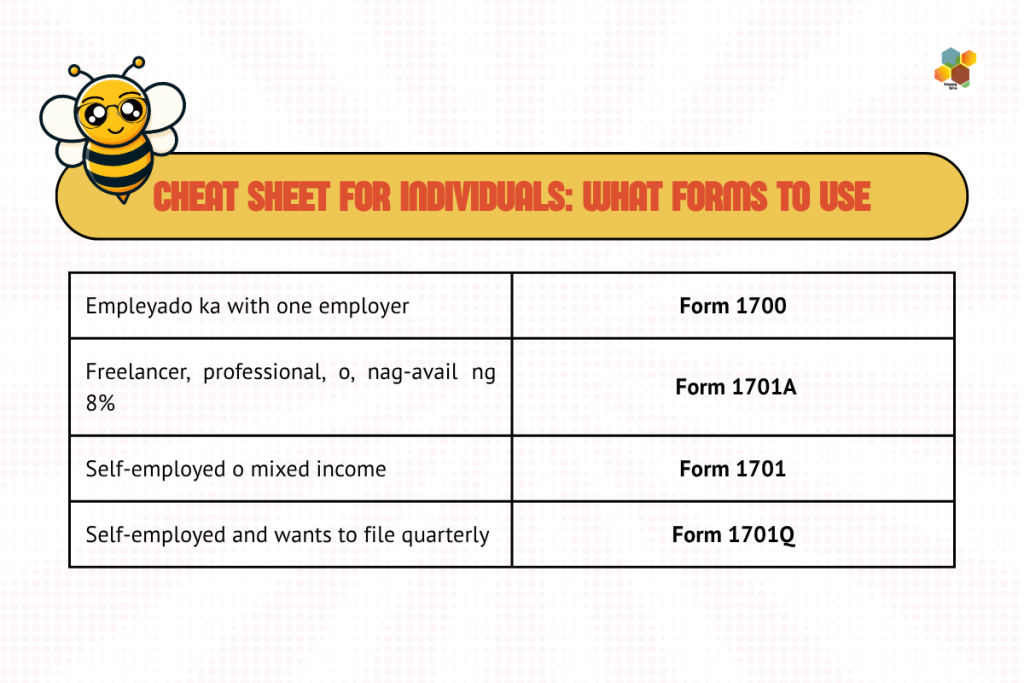
Which BIR form ang para sa’yo?
Dito sa part na ‘to usually na co-confuse ang karamihan — maraming forms para sa iba’t ibang situation. So, let’s simplify them.
For Individuals
- BIR Form 1700 – From one employer, walang other source of income. The simplest one.
- BIR Form 1701A – May business or profession ka, nag-avail ng 8% flat rate or OSD.
- BIR Form 1701 – Self-employed with itemized deductions or mixed income.
- BIR Form 1701Q – Quarterly filing for self-employed individuals.
For Businesses or Corporations
- BIR Form 1702-EX – Tax-exempt entities
- BIR Form 1702Q – Quarterly corporate ITR
- BIR Form 1702-MX – Mixed income, multiple tax rates
- BIR Form 1702-RT – Regular corporate rate. Straight to the point
Bakit kailangang mag-File ng ITR?
It’s not just about compliance; may mga very practical reasons kung bakit mahalaga ang ITR sa buhay mo.
- Staying legally compliant — walang BIR notice, walang stress
- Avoiding penalties — that money is better spent elsewhere
- To apply for loans, credit cards, Pag-IBIG & housing loans, and Visa
Your ITR is basically the receipt ng pagiging financially functional adult.
So, tuwing kailan ang deadline?
Mark your calendars. APRIL 15 — Every Year. Non-negotiable. You can file manually (by going to your RDO) or online via eBIRForms. We recommend online filing — walang pila, and it’s much easier to track.
🐝 Pro tip: Huwag mong hintayin ang April 13 bago ka magsimula. The BIR website at system tend to slow down – or straight-up crash – kapag malapit na ang deadline, so better to do it earlier. Para na rin sa peace of mind mo.
Bakit kailangan mag-file ng ITR?
Procrastinating on tax filing can lead to real financial consequences. And it comes with a expensive price tag:
- 25% Surcharge — Computed on the tax amount due. Oo, ganon kalaki. Sa ₱10,000 na tax due, dagdag ₱2,500 agad.
- Compromise Penalty — Ranges from ₱1,000 to ₱25,000, depending on the violation.
- Interest — Charged based on the annual market rate prescribed by the BSP, computed from the original due date until the date of payment.
Step-by-Step: Paano Mag-File ng ITR Online
Now that you all know that, here’s how to file your ITR online using the BIR’s eBIRForms system, step by step:
- Go to BIR’s Website (www.bir.gov.ph) → click “eServices” → find eBIRForms.
- Download and install the Offline eBIRForms Package.
- This only works on Windows. Sorry, Mac users
- Open the App and enter your taxpayer information
- Choose the correct Income Tax Return form for you, then click “Fill Up.”
- Fill in all required fields. Then: SAVE. YOUR. FILE. Baka mag-crash ang software — don’t risk it.
- Go to the Computation section. Input your taxable income — the system calculates your tax due automatically.
- Double-check everything — names, figures, decimal points, RDO code. Kapag okay na lahat, click “Validate.”
- Click “Submit / Final Copy” in the eBIRForms system. If successful, you’ll receive a Filing Reference Number (FRN), which confirms the BIR has officially received your return.
- Submission failed? Click “Final Copy” to view alternative submission options.
- Wait and check your inbox (and spam) for the BIR confirmation email. Save it as proof of filing.
- Pay your tax due via these online payment channels: GCash, Maya, LandBank, UnionBank, MYEG PH.
- For bank payments, print three (3) copies of your BIR Form and your BIR email confirmation, then bring them to any BIR Authorized Agent Bank (AAB) for payment.
Tips Para ‘Di Ka Mag-Panic Tuwing ITR Season
The goal isn’t just to file, but also to never feel like you’re scrambling every single year. Here’s how to make the whole process less of a nightmare:
- Organize as you go. Huwag mong hintaying mag-April bago ka mag-prepare ng mga kailangan.
- Mag-set ng monthly “tax date.”Kahit 30 minutes lang kada buwan para i-update ang records mo.
- Use folders — physical or digital. Being organized is the biggest advantage you can have during tax season.
- File BEFORE the deadline. The peace of mind when you’ve filed by the end of March vs scrambling on April 14? Chef’s kiss.
- You don’t have to figure it out alone. Whether it’s a trusted accountant, a knowledgeable friend, or a team like Happy Hive, there is zero shame in asking for help.
Let Happy Hive handle the compliance chaos — para ikaw, focus ka sa negosyo mo (o sa pahinga).
📩 Book a Free Consultation with us, here.
📱 Follow us for more tips & kadamay sa adulting woes
🔖 Save & share this with a friend na kailangan nito